

Quick answer: Handbag photography needs more shots than most products, because bags have no built-in size reference and mix materials like leather, suede, and canvas. This guide covers styling and lighting basics, the full shot list a product page needs, and how tools like Modelia's AI handbag generator help brands produce that shot list at catalog scale.
Handbag photography is one of the hardest categories in fashion ecommerce. Most catalog teams don't find that out until returns start piling up. A bag on a white background tells a shopper almost nothing: is it a clutch, a tote, or a weekender?
That guesswork gets expensive fast. A single bag SKU needs a front shot, a back shot, an interior shot, a hardware shot, and usually an on-body shot for scale. Multiply that across every colorway you stock, and a catalog of a few dozen bags can mean hundreds of images to plan, shoot, and edit.
This guide starts with styling and lighting basics. Then it covers the full shot list a product page needs, and how AI-generated on-model images change the math for brands shooting that list across a full catalog.
Handbag Photography Tips for a Clean, Consistent Shot
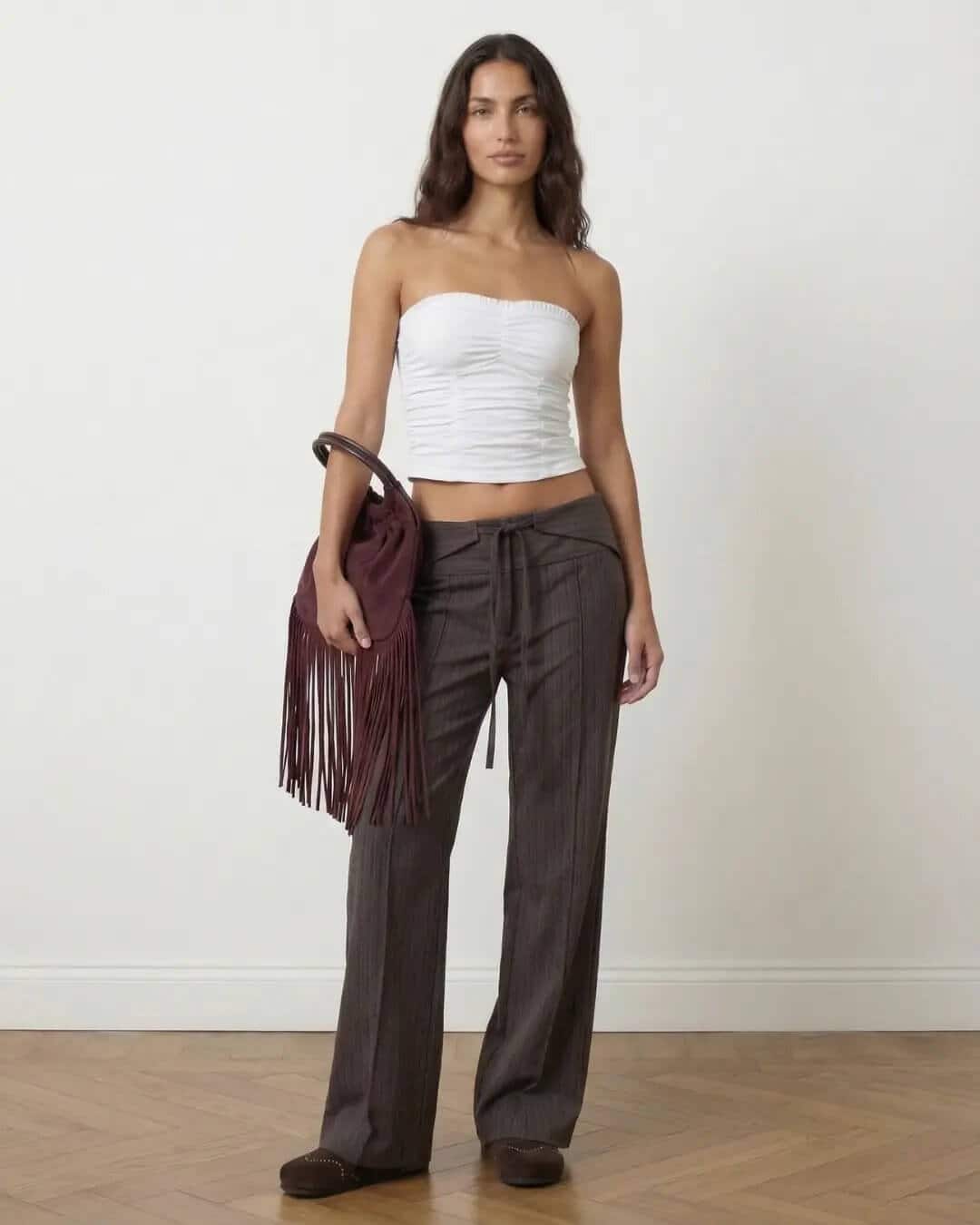 AI-generated on-body shot of a handbag for fashion brand Nícoli. Scale and drape at a glance, a shot traditional flat photography can't give you. Made with Modelia.
Before the catalog problem, there's the shot in front of you. These basics separate a bag photo that sells from one that just documents the product.
Prep and Shape
Use a firm filler. A shaped foam insert or rolled towel holds a bag's shape better than tissue paper, which can look lumpy on a bag that's been stored flat.
Check straps through the lens. A strap that looks straight to your eye can still look crooked once it's flattened into a photo, so check it in the viewfinder, not by hand.
Clean hardware every shot. Wipe dust off with a dry cloth. For smudges on leather or metal, add a little rubbing alcohol to the cloth and let it dry before you shoot.
Lighting Setup
Use two lights, not one. A single light creates hot spots on shiny surfaces and leaves detail, like the inside of a buckle, too dark to see. Add a second, softer light from the other side.
Angle your lights to cut glare. Metal zippers and buckles reflect light like a mirror. Point your lights slightly off to the side instead of straight on, and the glare mostly disappears.
Shoot at f/8 to f/11. This keeps the whole bag sharp, front to back, without the blur a wider aperture can cause.
Watch neutral colors closely. Beige and gray shift more under studio light than bold colors do, so check these shots against the real bag before you publish.
Key Angles
Lead with the front view. Most shoppers see this first, so it should show the bag's true shape, not a flattering angle.
Don't skip the back. It often shows a second pocket or a different texture, and skipping it leads to "not as pictured" complaints.
Add a close-up. A tight shot of the zipper, stitching, or hardware helps justify a higher price.
Show scale. A shot with the bag on a body or next to a hand is the one most guides skip, and it's the one that actually answers "how big is this?"
Catalog Consistency
These tips fix one bag. They don't fix the twenty bags after it. Mark your camera and light positions with tape so nothing drifts between shots, and shoot every colorway of a SKU back to back so the lighting stays the same across all of them.
These techniques photograph one bag well. They don't solve what actually slows a catalog team down: doing this same list for every colorway, across every SKU in the collection. That's a production problem, not a technique problem.
The Shot Types Every Handbag Photography Set Needs
Most guides cover a few of these shots. A full set for ecommerce needs all of them.
Front Hero
The main image on the product page. Clean background, even light, and the bag's true shape, not a flattering angle.
Three-Quarter Angle
Shows depth the front view can't. Usually the second image a shopper checks.
Back and Side
Confirms nothing's different on the reverse. Skipping it causes "not as pictured" complaints.
Interior and Lining
Shows pockets and lining material. Answers questions the product description can't.
Hardware Close-Up
Zippers, buckles, and stitching. A blurry close-up undercuts a premium price point.
On-Body Scale
The most important shot for size. Shows the bag carried or worn.
Colorway Set
The same shot list, repeated per color. This is where one-by-one production slows teams down most.
Marketplace White Background
A cropped, plain white version for marketplaces like Amazon and Etsy that require it.
The Real Cost of Traditional Handbag Photography at Scale
Bags are harder to shoot than most products. They have no body to hold their shape, and they often mix leather, suede, canvas, and metal hardware in one piece, each needing different light. That's real setup time before you even multiply that shot list across a catalog.
What Drives the Cost
A single shoot for one bag, one colorway, means stuffing it, arranging the straps, lighting for mixed materials, and a retouching pass after. Studio time, styling props, and cleanup all add up before a single image is ready to publish, and none of that cost drops just because the bag is one SKU out of hundreds.
The Colorway and SKU Multiplier
Catalog teams describe this as generating everything "one by one," with no way to batch the process. That eight-shot list from above doesn't shrink with scale. It just repeats, color after color, SKU after SKU, and then has to be resized and reformatted again for every channel the product appears on.
A Growing Problem, Not a Fixed One
The global handbag market is projected to grow to $81.79 billion by 2030, up from $56.48 billion in 2024. That means the number of SKUs brands photograph each season keeps growing too, and a process built around shooting one bag at a time doesn't scale with it.
How AI Handbag Photography Works for Ecommerce Teams
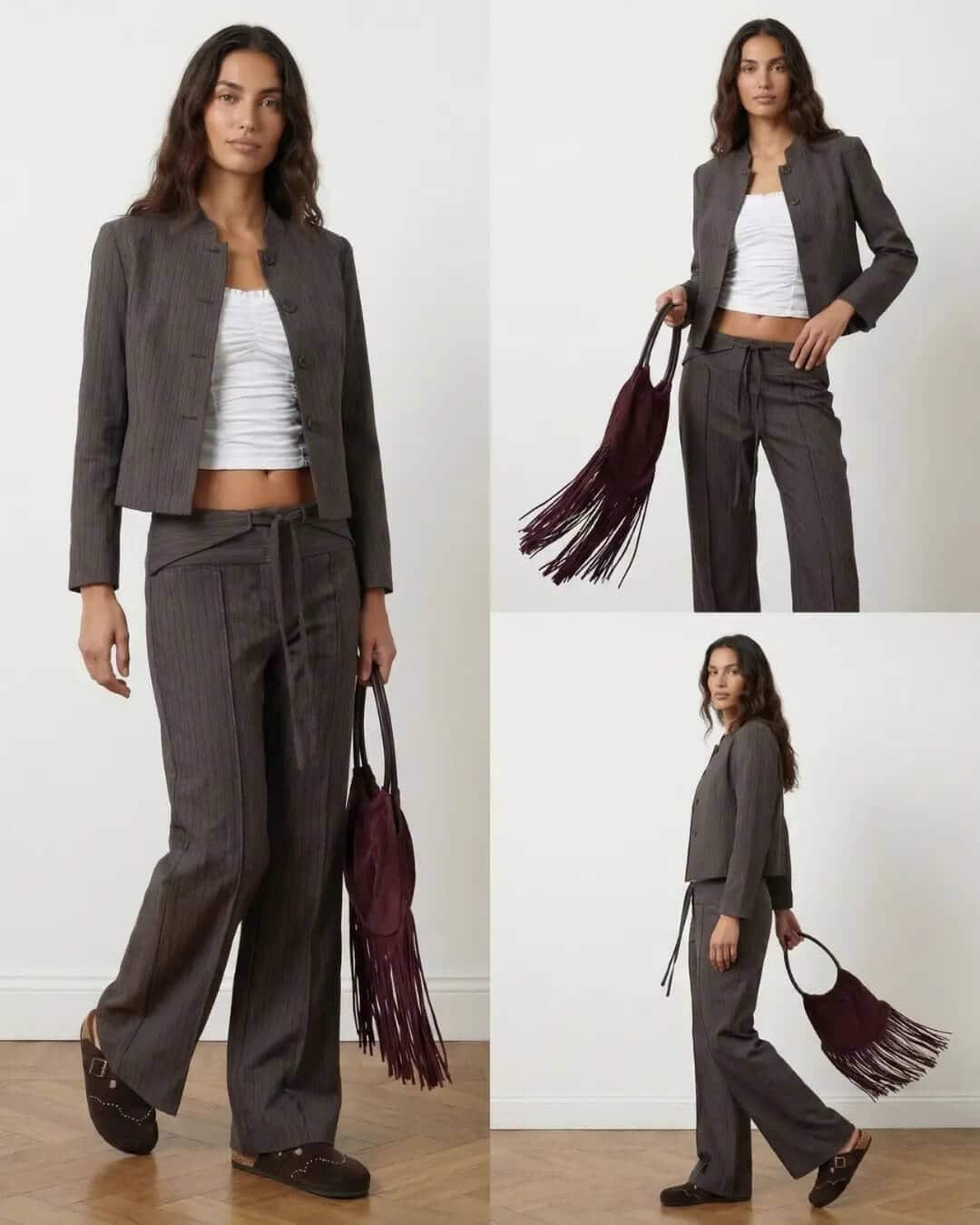 AI-generated model image for Nicoli, a fashion brand based in Spain. Featuring their fringe handbag in deep burgundy, styled with the brand's pinstripe tailoring set. Created with Modelia.
Modelia's bag-on-model generation removes the reshoot step from most of that list. Upload one photo of the bag, and it places the bag on a styled AI model with a natural pose. That's the on-body scale shot traditional photography struggles to produce quickly.
The workflow is built for a team, not a single shooter:
Upload a product photo of the bag or backpack
Describe the model, styling, and background with a text prompt
Generate multiple on-body variations from that one source image
Repeat for each colorway with an AI color changer instead of booking a new session
Repeat the same process for every SKU in the collection
Teams that generate bag images one by one can spend a full month on a single season's catalog. Each image often needs several attempts, plus two people to review it before it ships. Generating a styled shot from one uploaded photo removes most of that bottleneck.
Reebok and Forever 21 already use Modelia to generate on-model images at catalog scale. The same process works for bags: one product photo in, a full shot set out.
Traditional vs. AI Handbag Photography: A Cost and Speed Comparison
Factor | Traditional shoot | AI handbag photography |
|---|---|---|
Turnaround per SKU | Days to weeks, depending on studio booking | Minutes per generated image |
Colorway variants | New setup and reshoot per colorway | Same source photo, new generation per colorway |
On-body/scale shot | Requires a model, stylist, and studio session | Generated directly from the product photo |
Consistency across catalog | Varies by shoot day, lighting, and model | Consistent lighting and styling across every SKU |
Marketplace reformatting | Manual export per channel | Coming soon: one generation, auto-formatted per channel |
Cost driver | Studio, model, and photographer day rates | Platform subscription and credits |
Brands using Modelia see up to a 90% reduction in campaign production costs compared to traditional shoots, which tracks with what a bag brand would expect from replacing per-colorway reshoots with a single generation workflow.
Handbag Photography Across Marketplaces and Sales Channels
A bag brand rarely sells in one place. Shopify, Amazon, Etsy, and paid social ads each want a different crop, ratio, and file size for the same image. Some retailer systems even cap how many images you can upload per product.
That turns channel distribution into its own cost center. A team with a strong shot set still has to resize and rename every file for every channel by hand, and one wrong filename can turn an automatic upload into a manual fix.
Modelia's Multi-Platform Image Formatting feature is built for this. Generate the image once, and it automatically resizes and reformats it for Shopify, Amazon, Google Ads, Meta Ads, and more. That removes the export work that currently eats hours per product drop.
Or, build a per-channel spec sheet so nothing gets rejected for the wrong crop or file size. For more on building a photography process around your catalog instead of a single shoot, see this guide to product photography for ecommerce.
Frequently Asked Questions About Handbag Photography
What shots does a handbag product page need at minimum?
At minimum, a handbag product page needs a front hero shot, a three-quarter angle, a back view, and one on-body or scale shot. Interior and hardware detail shots are strongly recommended for bags with visible compartments or premium hardware.
How many product images does a handbag need for ecommerce?
Most handbag listings need five to eight images per colorway: hero, three-quarter, back, interior, hardware detail, and at least one on-body shot. Marketplaces like Amazon often require a separate white-background version in addition to lifestyle images.
Can AI generate realistic on-body handbag photography?
Yes. Tools like Modelia's AI handbag generator take a single product photo of a bag and generate it being carried by a styled AI model, producing the scale reference that a flat product shot can't provide on its own.
Why is handbag photography harder than clothing photography?
Handbags have no inherent size reference the way clothing has a body to hang from, and they often combine multiple materials, such as leather and hardware, that each need different lighting to look accurate in the same shot.
Does AI handbag photography work for different colorways?
Yes. Since the generation starts from one product photo, brands can generate on-body and styled shots for each colorway without rebooking a photoshoot for every color variant.
What image specs do marketplaces require for handbag listings?
Requirements vary by platform. Amazon and Etsy typically require a pure white background for the primary listing image, while brand websites and social ads often use lifestyle or on-body imagery instead. Checking each channel's current spec sheet before export avoids rejected uploads.
Get Your Handbag Catalog Photography-Ready
If your team still books a new shoot for every colorway, the fix isn't more studio days. It's removing the reshoot step entirely. Start with accurate on-body shots, generate every colorway from one photo, and build channel exports around a repeatable process instead of a last-minute scramble each season.


