
Quick answer: To reduce ecommerce returns with AI, fashion brands use an AI garment fit tool to preview how a piece looks tighter, looser, longer, or shorter on a model before the product photo ever gets published. Catching fit problems at the content stage — instead of after a customer opens a package that doesn't match the photo — targets the single biggest driver of apparel returns: poor fit.
Your return rate isn't really a shipping problem or a customer problem. Most of the time, it's a photo problem.
Shoppers can't touch a garment before they buy it, so they read the product image as a promise about how that piece will fit. When the image oversells the drape, the length, or the silhouette, the return is almost guaranteed. This guide breaks down where fit-related returns actually start, and how an AI garment fit tool lets your team catch and fix them before a single order ships — no reshoot required.
Brands using AI fashion images for ecommerce are already cutting production costs while publishing faster. The same AI infrastructure that replaces the photoshoot can also replace the guesswork around how a garment fits on the model in your product images — which is where this guide picks up.
Why Fashion Brands Need to Reduce Ecommerce Returns With AI
Return rates in fashion aren't a rounding error. They're one of the largest line items eating into margin.
The average ecommerce return rate hit 16.9% in 2024, and consumers returned products worth $890 billion that year, according to a National Retail Federation and Happy Returns report cited by Shopify. Apparel sits well above that average, and the reason is consistent across every study on the topic.
When shoppers were asked why they returned items, 65% said the product simply didn't fit. That's not a shipping delay, a damaged box, or a wrong color. It's a mismatch between what the photo implied and what arrived.
Here's what usually causes that mismatch:
- The sample size doesn't match the size the shopper ordered — the photographed garment was a medium, but the product page has to represent the whole size run.
- The drape looks different in a static photo than it does once fabric moves with a real body.
- The product page never shows an alternate fit — slim vs. relaxed, cropped vs. regular — so shoppers guess.
- Sizing charts and photos disagree, and shoppers trust the photo first.
Product imagery isn't a side effect of this problem. In Baymard Institute's ecommerce UX testing, 23% of product pages don't provide a human model image at all, even though apparel, accessories, and cosmetics need that context to give shoppers an accurate sense of fit. Without it, your catalog is asking shoppers to guess — and guesses come back as returns.
Three Ways to Reduce Ecommerce Returns With AI: Checkout, Try-On, and Content Tools
Most of the AI tooling built to fight returns falls into one of two shopper-facing buckets. One asks for the shopper's height, weight, or usual size and recommends a size number. The other lets the shopper upload their own photo or body measurements to see the garment rendered on themselves — a form of virtual try-on. Both only work if your product photography already shows the garment's fit accurately in the first place.
There's a third, earlier point where AI can intervene: the content stage, before the image ever reaches a product page. This is where an AI garment fit tool operates, and it's a materially different job from either shopper-facing approach — it adjusts fit on the model in your catalog image, not on a photo of the individual shopper.
| Checkout Size Advisors | Shopper Self Try-On | Content-Stage Fit (AI garment fit) | |
|---|---|---|---|
| Who uses it | The shopper, at the point of purchase | The shopper, using their own photo or measurements | Your catalog, ecommerce, or creative team |
| What it does | Recommends a size based on shopper data | Renders the garment on the shopper's own body or avatar | Generates or adjusts the product image itself |
| When it acts | After the photo is already published | After the photo is already published, per shopper | Before the photo is published, once for the whole catalog |
| What it fixes | Shopper uncertainty about which size to pick | Shopper uncertainty about how it looks on their body type | Inaccurate or incomplete fit representation in the source photo |
| Best paired with | Accurate product photography | Accurate product photography | A size run with more than one silhouette or fit style |
None of these three replace each other. But if your product photography only ever shows one size, on one model, in one fit, both shopper-facing tools are working against an image that was never representative to begin with.
How an AI Garment Fit Tool Reduces Ecommerce Returns Before You Publish
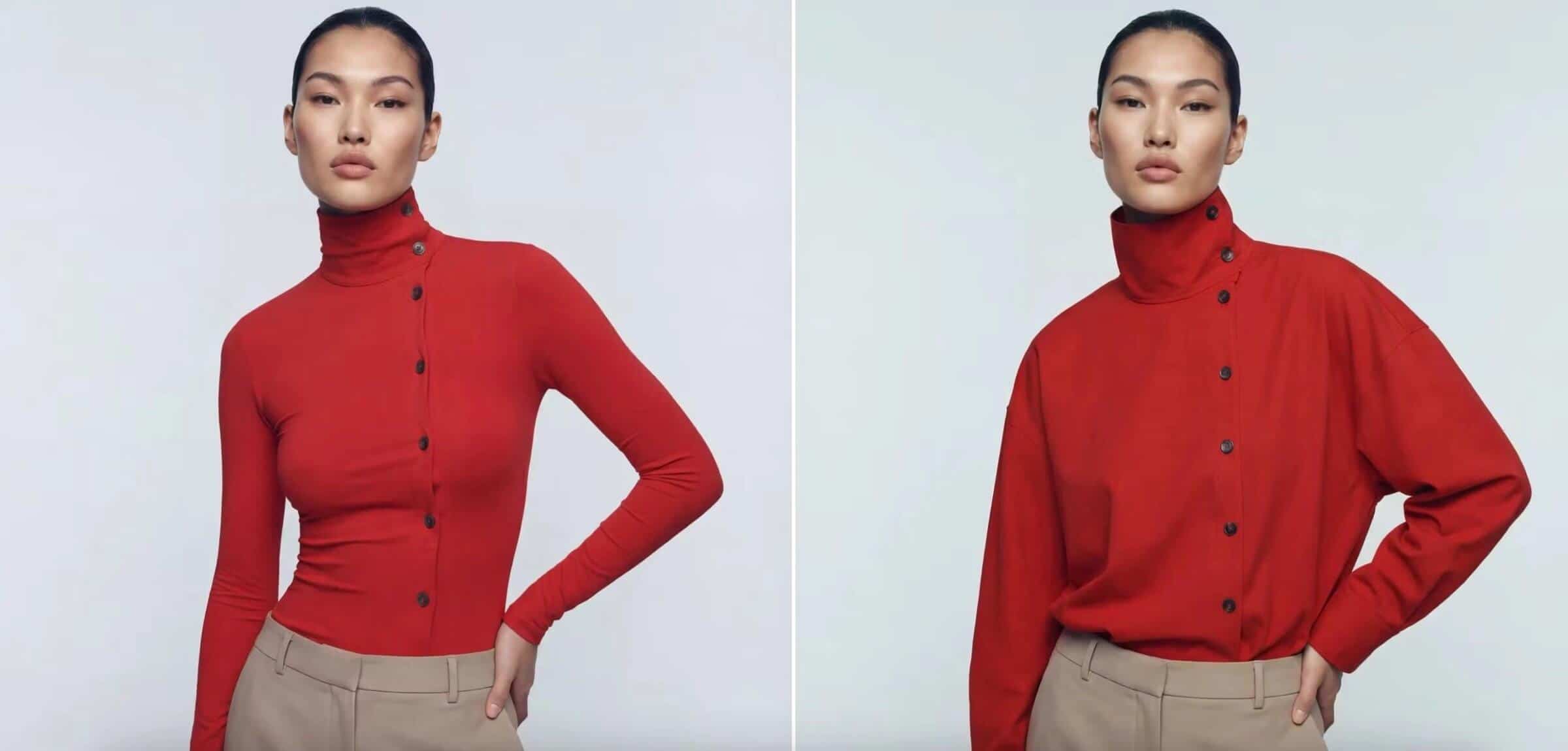
Modelia's AI garment fit tool lets your team adjust how a garment fits directly on an existing model image — tighter, looser, longer, shorter, or fully restyled — using a text prompt instead of a reshoot or a new sample.
Here's the business problem it solves: most brands can't afford to shoot every size, every fit variation, and every silhouette option for every SKU. So they shoot one sample, in one size, and let that single image represent an entire size run. Garment Fit closes that gap without adding a shoot day.
A typical workflow looks like this:
- Start with a model image. This can be a photographed sample or an image generated from your existing catalog with flatlay to model AI, which turns flat product shots into on-model photos in the first place.
- Describe the fit change you need — "make the hem land at the ankle instead of the floor," or "show this in an oversized silhouette."
- Generate the updated image and review it alongside the original.
- Export and publish the fit-accurate version to the product page, or keep both versions to show shoppers a size or style comparison.
What this replaces, concretely:
- A second sample run just to photograph a different fit
- A reshoot day when a garment's fit spec changes late in production
- Guesswork about how "oversized" or "cropped" will actually read once the piece is on a body
What You Can Adjust With Garment Fit
- Make garments tighter or looser without a new sample
- Adjust hem length and overall proportions
- Test slim, regular, and oversized fit styles on the same base image
- Refine how a single garment presents across a multi-fit product line
A 4-Step Framework to Reduce Ecommerce Returns With AI Garment Fit
Use this checklist before your next collection goes live. It's built specifically around the fit-accuracy gap, not general photography advice.
Step 1 — Audit Your Current Fit Representation
Pull ten of your highest-return SKUs. For each one, check whether the product photo shows the garment's actual fit on the size the shopper is most likely to order, not just the sample size.
Step 2 — Flag the Silhouette Gaps
List every SKU sold in more than one fit style (slim, regular, oversized) that's currently represented by a single photo. These are your highest-risk pages for fit-related returns.
Step 3 — Generate Fit-Accurate Variants
Use an AI garment fit tool to create an image for each silhouette or size-range variant you flagged, instead of scheduling a reshoot for each one.
Step 4 — Pair the Image With the Size Chart
Make sure the fit-accurate image sits next to matching size and measurement information on the page. Shopify's own return-prevention guidance recommends including size guides — and the size the model is wearing — directly on the product page, and a mismatched pairing undoes the value of the image.
What It Costs to Reduce Ecommerce Returns With AI vs. Reshoots
A reshoot to capture one additional fit variant isn't a small line item once you multiply it across a real catalog.
Consider a mid-size brand with 300 SKUs, three fit variants per style, and a traditional cost of $45 per image. Capturing just one additional fit image per SKU means 300 extra images — roughly $13,500 in incremental photography spend, before studio time, model fees, or scheduling delays are factored in.
Generating those same fit variants with an AI garment fit tool costs a fraction of that, since there's no sample, studio, or model booking required for each variation. You can model your own numbers — including your current SKU count, size run, and image costs — with Modelia's ROI calculator to see the gap for your specific catalog. If you're weighing whether to cut photoshoots out of your workflow entirely, our guide on getting professional fashion images without a photoshoot covers the broader cost case.
The upside compounds. True Fit reports that multi-brand retailers using fit guidance saw a 24% reduction in fit-related returns from bracketing, and single-brand direct-to-consumer retailers saw reductions as high as 50% — and that's from size guidance alone, without touching the product photo itself. Pairing accurate fit imagery with accurate size guidance stacks both effects.
Frequently Asked Questions About Reducing Ecommerce Returns With AI
What is the average return rate for ecommerce, and how much higher is it for clothing?
The average ecommerce return rate was 16.9% in 2024, according to the National Retail Federation, and rates run higher for products that require a specific fit, like clothing and footwear. Fashion and apparel consistently rank as the most-returned online categories.
Why do people return clothes bought online?
Fit is the leading reason across nearly every major study on the topic. Shopify's own research found that 65% of online shoppers who returned an item said it simply didn't fit, ahead of damage, mismatched descriptions, or price regret.
Can AI actually reduce ecommerce returns, or does it just recommend sizes?
Both, depending on the tool. Checkout-stage AI recommends a size to the shopper. Content-stage AI — like an AI garment fit tool — fixes the source problem by generating an accurate fit representation in the product image itself, before the shopper ever has to guess.
What's the difference between an AI garment fit tool and virtual try-on?
Virtual try-on is shopper-facing: the customer uploads their own photo or measurements to see how a garment looks on their individual body. An AI garment fit tool is a production tool your team uses to adjust and preview fit on the model in a catalog image before publishing it — the output is a finished product photo for your whole audience, not a personalized render for one shopper.
Does AI garment fit editing work on photos I've already shot?
Yes. Upload an existing image of a model wearing the garment, describe the fit change you need, and generate the updated version. You don't need the original sample or a new photoshoot to test a different silhouette.
How much does an AI garment fit tool cost compared to a reshoot?
Modelia's plans start with a free tier for testing, with paid plans from $35 to $300 a month depending on volume, all cheaper than booking a single additional sample and studio day. Full plan details are on the pricing page.
The Bottom Line
Fit-related returns aren't inevitable — they're a byproduct of product photography that only ever shows one size, on one body, in one silhouette. Fix that at the source with an AI garment fit tool, and you're addressing the return before the order ever ships, not managing the refund after it lands back in your warehouse.


