

Besides being a social network for sharing images with your friends and family, Instagram has become a showcase in which to make yourself known. It's one of the most powerful ecommerce platforms in the world nowadays, with over 2 billion monthly active users and more than 130 million shoppers interacting with shopping posts each month. That is why it shows a massive potential for fashion brands, beauty products, lifestyle goods and startups. But going from followers to customers can be hard; that is why we offer a little guide on how to sell on Instagram.
A guide that covers everything you need to know about how to sell on Instagram, with actionable strategies, tools to use and real Instagram sales tips that help you drive revenue and not just likes.
Step 1: Set Up Your Instagram Shop the Right Way
Before you can sell, you need to make your account shopable, that means having an aesthetic feed, quality posts and being active in the social environment. The first thing you will need to do is convert your account in a business account; as easy as following the next steps: Head to Settings > Account > Switch to Professional Account, and choose Business. This unlocks features like analytics, ads and Instagram Shopping that are fundamental for a business.
Connect Your Product Catalog
You’ll need a product catalog linked to Instagram through Meta Commerce Manager. You can connect it via Shopify, WooCommerce,or upload it manually.
Get Approved for Instagram Shopping
Instagram reviews your account before enabling product tagging. Make sure your business complies with their commerce policies and has an active website with listed products.
Step 2: Optimize Your Instagram Profile for Sales
Your profile is your store’s front door. Make it count.
Use a high-quality logo as your profile picture
Write a compelling bio that says who you are and what you sell
Add a link in bio (use tools like Linktree, Later, or a branded landing page)
Include a CTA in the copy of your posts (Call To Action) like “Shop now” or “Free shipping this week!”
Step 3: Post Content That Sells (Without Looking Like Ads)
Today’s users don’t want to be sold to, they want value and entertainment. That’s why visual storytelling works so well.
Here’s what converts:
Lifestyle shots showing products in real life
Before/after content for beauty, home or fashion
UGC (User-Generated Content) to build trust
Behind-the-scenes posts from production to packing
Reels that entertain while highlighting your product
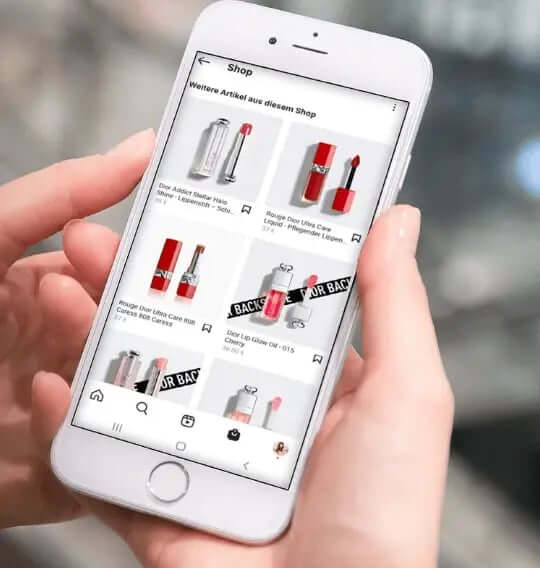
Step 4: Use Instagram Shopping Features to Drive Direct Sales
Once your shop is set up, take full advantage of Instagram’s ecommerce tools:
Product Tags: Tag items in feed posts, Reels, and Stories
Shoppable Stories: Add product stickers to drive quick clicks
Live Shopping: Sell in real time during live videos
Shop Tab: Ensure your products appear under the Explore Shop section
This turns your content into a seamless browsing-to-buying experience.
Step 5: Leverage Influencer Marketing and UGC to Build Trust
Word-of-mouth sells, especially on Instagram.
Influencer Collaborations
Work with micro- and nano-influencers who resonate with your niche. Offer affiliate deals or limited drops to create urgency.
UGC Campaigns
Encourage customers to tag you in photos. Repost them (with permission) and build a content pipeline of real product use.
Step 6: Boost Visibility with Hashtags, SEO, and Ads
If you want to grow fast, organic and paid visibility go hand in hand. Use a mix of broad, niche, and branded hashtags. Think:
#sustainablefashion, #ootd, #madeinitaly, #[yourbrandname]
Also, Instagram now indexes bios and captions. Include keywords naturally like “vegan handbags,” “linen summer dress,” or “handmade ceramics.”
And boost top-performing posts or create custom ads targeting your ideal customer. Try retargeting users who visited your website or engaged with your profile.
Step 7: Analyze Performance and Optimize Constantly
Don’t guess, track.
Use Instagram Insights or tools like Later, Iconosquare, or Meta Ads Manager to measure:
Which content drives the most clicks/sales
What time your audience is most active
Best-performing product types
Double down on what works. Cut what doesn’t.
Modelia: The AI Tool That Elevates Your Instagram Sales Content
If you’re serious about ecommerce on Instagram, visuals are everything. But creating stunning, high-converting imagery takes time, money, and effort, unless you use Modelia.
Modelia is an AI image generation platform designed for fashion and lifestyle brands. You can:
Create on-brand fashion imagery in seconds
Choose model types, poses, and styling
Replace backdrops, lighting, or garments with a click
Save time and reduce the cost of traditional photo shoots
With Modelia, your Instagram content can be as polished as Zara or H&M, without the overhead.
Try Modelia for free and start creating high-impact Instagram visuals in minutes.
Summary Table: Selling on Instagram at a Glance
Step | What to Do | Tools to Use |
|---|---|---|
1 | Set up your shop | Meta Commerce Manager, Shopify |
2 | Optimize your profile | Linktree, Canva |
3 | Post selling content | Modelia, Instagram Reels |
4 | Use shopping features | Product Tags, Live Shopping |
5 | Collaborate | Influencers, UGC |
6 | Promote | Hashtags, Instagram Ads |
7 | Track performance | Instagram Insights, Meta Ads |
The Ultimate User Guide to Virtual Try-On Features: How to Get the Best Experience
Virtual try-on technology is transforming online shopping, letting you see how clothes, accessories, shoes, or makeup look before you buy. But to get the most out of it, there are tips and tricks that can enhance your experience. This guide will help you navigate virtual try-on tools like a pro.
What is Virtual Try-On?
Virtual try-on combines augmented reality (AR), artificial intelligence (AI), and sometimes 3D modeling to simulate products on a user. Whether it’s trying on a pair of glasses, a jacket, or a lipstick shade, virtual try-on creates a realistic preview without the need to visit a physical store.
How to Get Started
Choose the Right Platform
Not all virtual try-on tools are created equal. Look for platforms that support high-quality 3D models, accurate sizing, and realistic textures. Many fashion and beauty brands now integrate these features directly into their apps or websites.Provide Accurate Information
For clothing or shoes, entering your correct measurements ensures the virtual fit is realistic. For accessories like glasses or jewelry, provide your face shape or hand size if the tool allows.Use Proper Lighting
When using a live camera try-on, natural or well-lit rooms give more accurate previews of colors and textures. Avoid dark or overly bright environments.Experiment with Styles and Colors
Don’t hesitate to try multiple styles, sizes, and colors. Virtual try-on allows risk-free experimentation, helping you discover options you might not have considered.Rotate and Zoom
Take advantage of interactive features like rotation and zoom. Viewing items from multiple angles ensures you understand how they look in motion and from different perspectives.Compare with Real Products
Some platforms allow side-by-side comparisons or AR overlays on your existing wardrobe. This helps visualize how new items complement what you already own.
Recap on how to sell on Instagram
Mastering how to sell on Instagram is no longer optional, it's essential. In today’s fast-moving ecommerce landscape, Instagram stands out as one of the few platforms where you can build brand awareness, drive product discovery, and convert sales, all in one place.
Whether you’re a solo founder running a niche DTC brand or a marketing lead for a growing fashion retailer, Instagram offers unmatched opportunities to connect with your target audience in a visually compelling way. With features like Instagram Shopping, Reels, influencer partnerships, and shoppable Stories, the platform makes it easier than ever to transform engagement into revenue.
The key is to approach Instagram not just as a social media channel, but as a full-funnel sales platform. From setting up your shop and optimizing your profile, to posting strategic content and analyzing what works, every step matters. And with the right tools in place, you don’t have to do it all manually or spend thousands on production.

In short, if you want to stand out on Instagram and consistently drive sales, you need the perfect blend of:
Compelling visual content
Optimized sales tools (like product tagging and Instagram Shopping)
Audience-driven strategies (like Reels, UGC, and influencer collabs)
Performance tracking and continuous improvement
Smart automation tools like Modelia to scale effortlessly
Start viewing your Instagram feed as more than just a collection of posts, see it as your best-performing storefront.
FAQ: How to Sell On Instagram
What is the first step to selling on Instagram?
Set up an Instagram Business or Creator account, connect it to a Facebook catalog, and enable Instagram Shopping so you can tag products in posts and stories.
How can I showcase my products effectively on Instagram?
Use high-quality photos, short videos, reels, and carousel posts. Share behind-the-scenes content, styling tips, and user-generated content to engage followers.
What strategies help increase sales on Instagram?
Engage with your audience through comments and DMs, use targeted ads, leverage influencer partnerships, and post consistently to keep your brand visible.
Do I need a website to sell on Instagram?
While Instagram Shopping allows direct purchases, having a website or landing page gives more control over branding, payment options, and customer experience.


